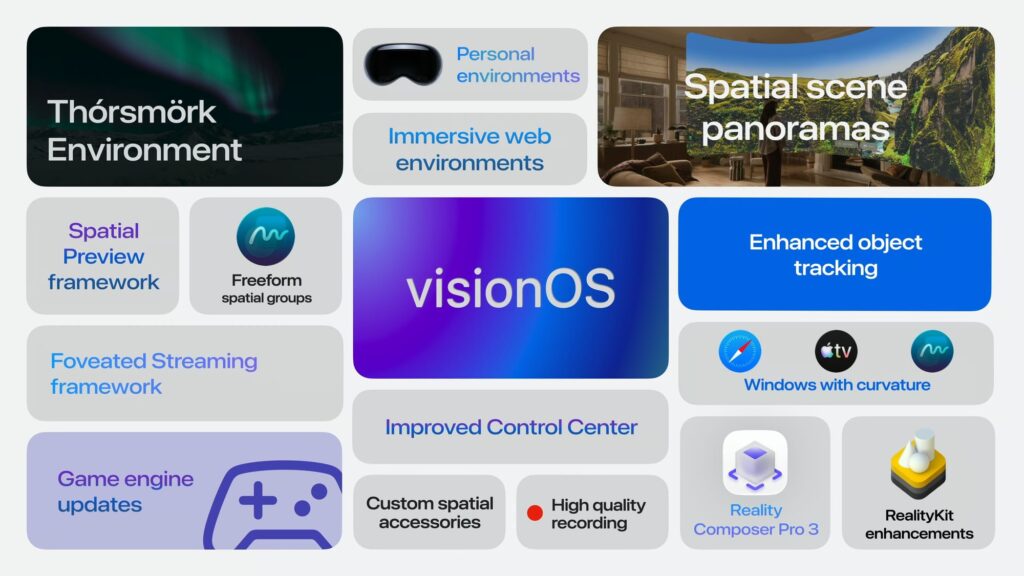
There’s a whole lot more coming in visionOS 27 than what Apple announced in its keynote and blog post.
Announced by Apple at WWDC 2026 this week, visionOS 27 will be the fourth major operating system version for Apple Vision Pro headsets.
While Apple’s main WWDC 2026 barely mentioned the Vision Pro operating system, its documentation and developer talks reveal that visionOS 27 is one of the biggest upgrades yet, with (preconfigured) held object tracking, an IR LED tracked accessories framework, unfoveated screen recording, and a range of other major improvements.
visionOS 27 will arrive “this fall”, for both the M2 and M5 models of Apple Vision Pro. The first beta release of visionOS 27 is available now, though it lacks many of the features coming in the stable launch.
visionOS 27
Siri AI & Visual Intelligence
Though not coming with the initial visionOS 27 release, Apple says that “later this year” Siri AI, an LLM-powered overhaul of its digital assistant, will come to its major operating systems, including visionOS.
Siri AI is powered by the next-generation Apple Foundation Models, which were co-developed with Google and based on its Gemini models (reportedly via a $1 billion/year licensing deal). As has always been the case with Apple Intelligence, some tasks run on a small on-device model, while more complex tasks are handed off to Apple’s Private Cloud Compute system.
Apple says Siri AI is a “profoundly more capable and conversation assistant” than traditional Siri, with “personal context understanding, broad world knowledge, and more”.
0:00
Siri AI as a pinned spatial object on visionOS 27.
In visionOS, Siri AI will take the form of a persistent orb that you can pin to a physical spot in your room. You can start speaking to Siri AI by simply looking at the orb and speaking, bypassing the need to say “Siri”, though you can still do that if you want.
Siri AI on visionOS will also support Apple’s Visual Intelligence feature, letting you “search, ask questions, and take action” relating to your physical and virtual surroundings. In terms of capabilities, it seems to sit somewhere between Meta AI on Quest 3’s Horizon OS and Gemini on Samsung Galaxy XR’s Android XR.
0:00
Apple’s Visual Intelligence on visionOS 27.
visionOS 27 also includes a dedicated Siri app, letting you access previous conversations, and offering a preinstalled alternative to third-party AI chatbot apps like ChatGPT, Gemini, Claude, Grok, and Meta AI.
0:00
The Siri app on visionOS 27.
The next-generation Apple Foundation Models will also bring:
- Significantly more realistic image generation in Image Playground.
- Automatic tab organization in Safari.
- The ability to upgrade the strength of your saved passwords with a single tap.
- Personalized Smart Replies in Messages.
Spatial Panorama Environments
visionOS 2 brought the ability to add synthetic stereoscopy to 2D images, and then visionOS 26 brought the ability to turn 2D images into volumetric spatial scenes, with a deep sense of perspective enabled by Gaussian splatting.
visionOS 27 extends this spatial scenes concept to your iPhone-captured panoramas.
0:00
Spatial panoramas on visionOS 27.
You can set these spatial panoramas as your visionOS home environment, meaning they can be the background for your windows and volumes in the Shared Space.
Higher Frequency Object Tracking
Back in visionOS 2, Apple added the ability for Vision Pro to track specific real-world 3D objects that app developers prespecify.
Developers provide a 3D model of the object they want to be tracked to the Create ML tool on their Mac before app compilation, and over the course of several hours it trains a neural network for the object and bakes it into the app.
While genuinely useful for enterprise applications, the visionOS 2 object tracking system was only designed to be used for static objects, mainly in order to anchor virtual content to them, and updated at around 5Hz (though in practice often slower).
visionOS 27 adds a high-frame rate object tracking mode that is suitable for moving and held objects. While Apple doesn’t say exactly what the update rate is, initial reports from developers suggest it may be around 30Hz.
0:00
High frame rate object tracking in visionOS 27.
To track held objects, Apple strongly recommends using the new Extended Training mode, which greatly improves tracking performance though also “significantly” increases the machine learning model training time. XR enthusiast Brad Lynch found that it took around 18 hours to train a fish toy, for example.
While high frame rate object tracking is leagues better than what came before, it’s important to note that it still has a significantly lower update rate, and thus higher latency, than hand tracking or tracked accessories. And speaking of tracked accessories, we’re likely to see a lot more of them soon.
IR LED Tracked Accessories
For visionOS 26 last year, Apple worked closely with Sony and Logitech to add hardcoded support for the PlayStation VR2 Sense controllers and Muse digital stylus, which both have a constellation of infrared LEDs under the plastic of their body.
With visionOS 27, Apple has opened this process up to any interested company by adding the necessary APIs to enable them to make their own IR LED tracked accessories for Vision Pro, similar to how any company can make SteamVR “Lighthouse” Tracking accessories on PC.
Optical tracking runs at 90Hz, and this is fused with the IMU accelerometer and gyroscope data from the object, enabling the same quality of tracking you’d expect from PlayStation VR2 Sense controllers.
0:00
A tracked IR LED accessory in visionOS 27.
There are two possible software support paths available.
- Companion App: The hardware maker can release a visionOS companion app for the hardware, essentially an installer for it, that registers the shape of the object and configuration of its IR LEDs with visionOS so that other apps can use them. This path would be highly suitable for a consumer device.
- Built-In To App: Alternatively, a developer can build the object details into an app that utilizes the accessory, negating the need for a separate device companion app. This path would be ideal for enterprise.
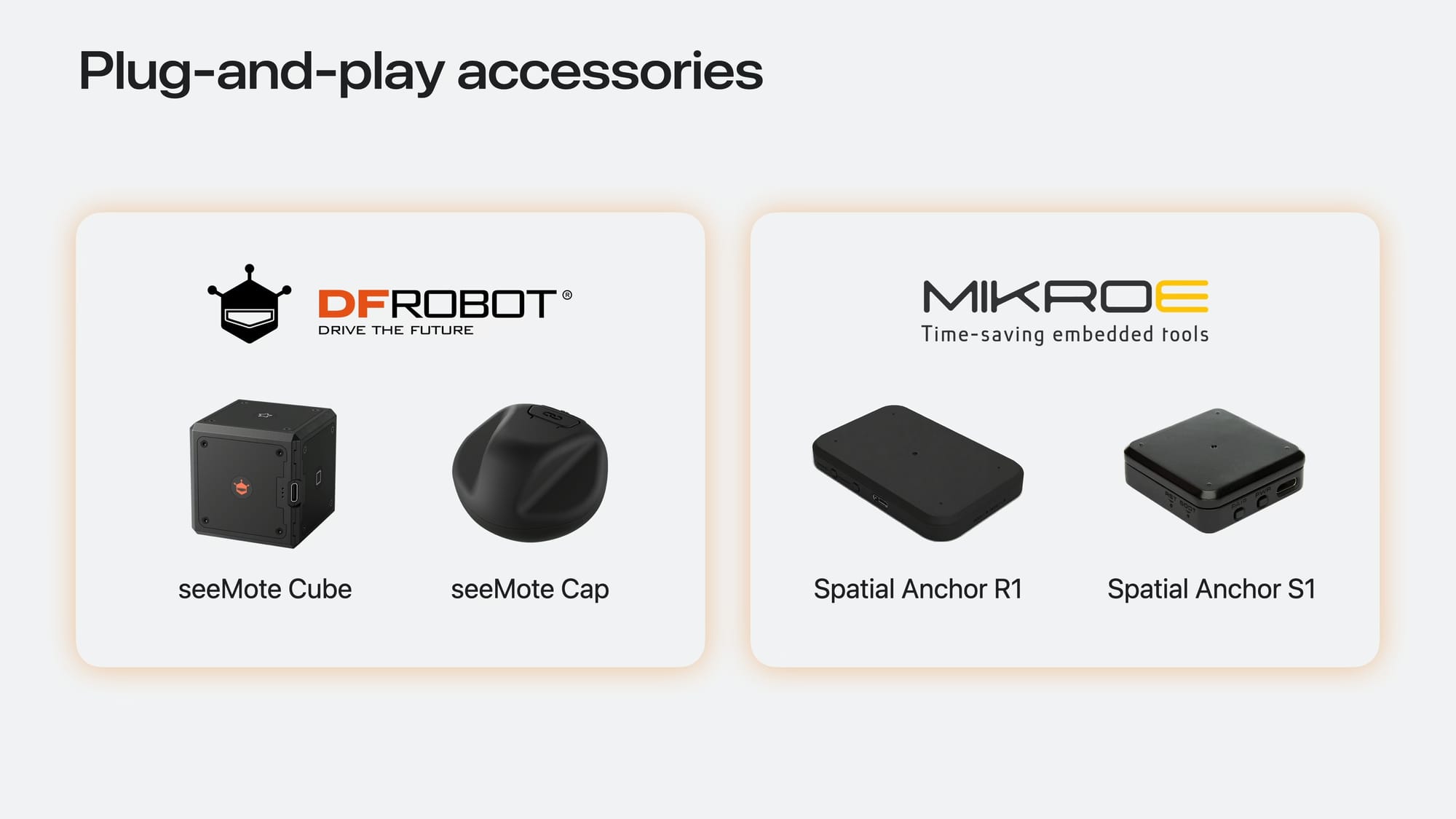
DFRobot and MikroE are making reference hardware and developer kits for this, and will release them later this year. Companies can use these directly, or as the basis of their own accessories, lowering the barrier to entry compared to building from scratch.
Thórsmörk Environment
visionOS 27 will bring a new environment option for the Shared Space: Iceland’s Thórsmörk valley. It translates as Thor’s Valley, and it’s widely considered one of the most scenic places on the planet.

Apple’s environments all have day and night modes, and Thórsmörk’s nighttime variant features a dramatic aurora borealis.
Thórsmörk will be the 10th virtual environment for visionOS, following the addition of Jupiter from Amalthea in visionOS 26.
All visionOS Environments
- Haleakalā — summit of the Hawaiian volcano
- Yosemite — wintry Yosemite National Park
- Joshua Tree — desert landscape in Joshua Tree National Park
- Mount Hood — Trillium Lake facing Mount Hood
- White Sands — White Sands National Park
- The Moon — the lunar surface
- Lake Vrangla — lakeside environment in Norway; added to visionOS 1 in July 2024
- Bora Bora — French Polynesian beach; added with visionOS 2
- Jupiter — viewed from Amalthea, one of Jupiter’s inner moons; added with visionOS 26
- Thórsmörk — Icelandic highlands, with an icy lake, mountains, snow and Northern Lights; announced for visionOS 27
Unfoveated Screen Recording
At all times in the Shared Space, and in many Full Space apps too, Apple Vision Pro uses always-on eye-tracked foveated rendering, only rendering the region of the image you’re currently looking at in full resolution.
This maximizes visual quality and performance, and is essential to how Apple Vision Pro headsets make good use of their 4K micro-OLED panels, but it has the tradeoff of meaning that in screen recordings, everywhere you’re not looking is a low-resolution blur.
It was possible to record unfoveated footage in the visionOS Simulator on a powerful enough Mac, but not on the headset.
0:00
High Quality recording on visionOS 27.
visionOS 27 adds a High Quality Recording option, which records up to 3 minutes of unfoveated 4K footage, completely on the headset, no Mac required.
It should make it much easier for developers, journalists, influencers, and content creators of all kinds to show off visionOS, and was one of the most highly requested features for Vision Pro.
Mac 3D Object Preview API
When connected to your Mac via Mac Virtual Display, macOS 27 adds an API to spawn a 3D object on visionOS 27, letting you preview objects in 3D space.
0:00
Apple’s built-in Preview macOS app supports it, meaning you can open a 3D object from Finder and preview it in seconds. And developers can add it to their own Mac apps too.
This API essentially lets developers add Vision Pro support to their 3D creation Mac apps with just a few lines of code, and without the need to build a visionOS app.
It even supports editing the model on the visionOS side using gaze-and-pinch controls, and these edits will then be reflected on the macOS side. It’s a two-way API. SharePlay is supported too, for collaborative spatial editing with Personas.
Apple says Cinema 4D and SketchUp are working on integrating the API, and we expect to see many more Mac apps do so once macOS 27 and visionOS 27 ship.
 David Heaney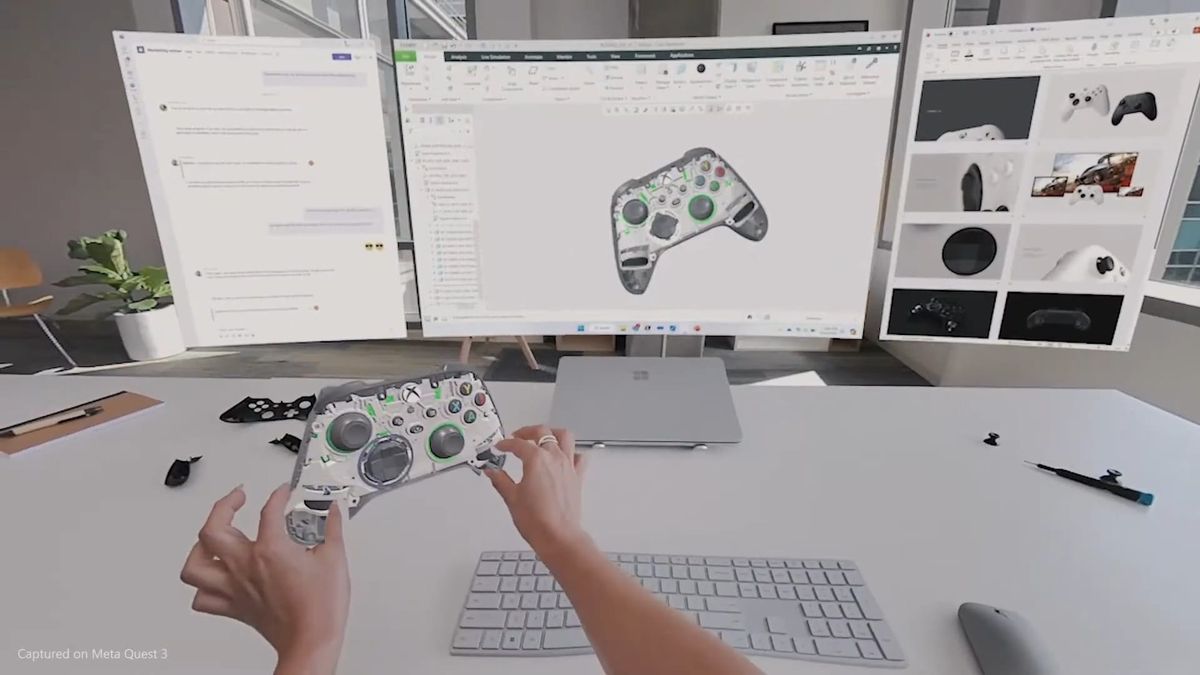
Microsoft and Meta announced something similar for Windows 11 and Horizon OS back in 2024, but as far as we’re aware, it has yet to ship.
New Control Center Look
visionOS 27 updates the look of Control Center, moving it into three panels for a larger and less crowded total space for the interface.
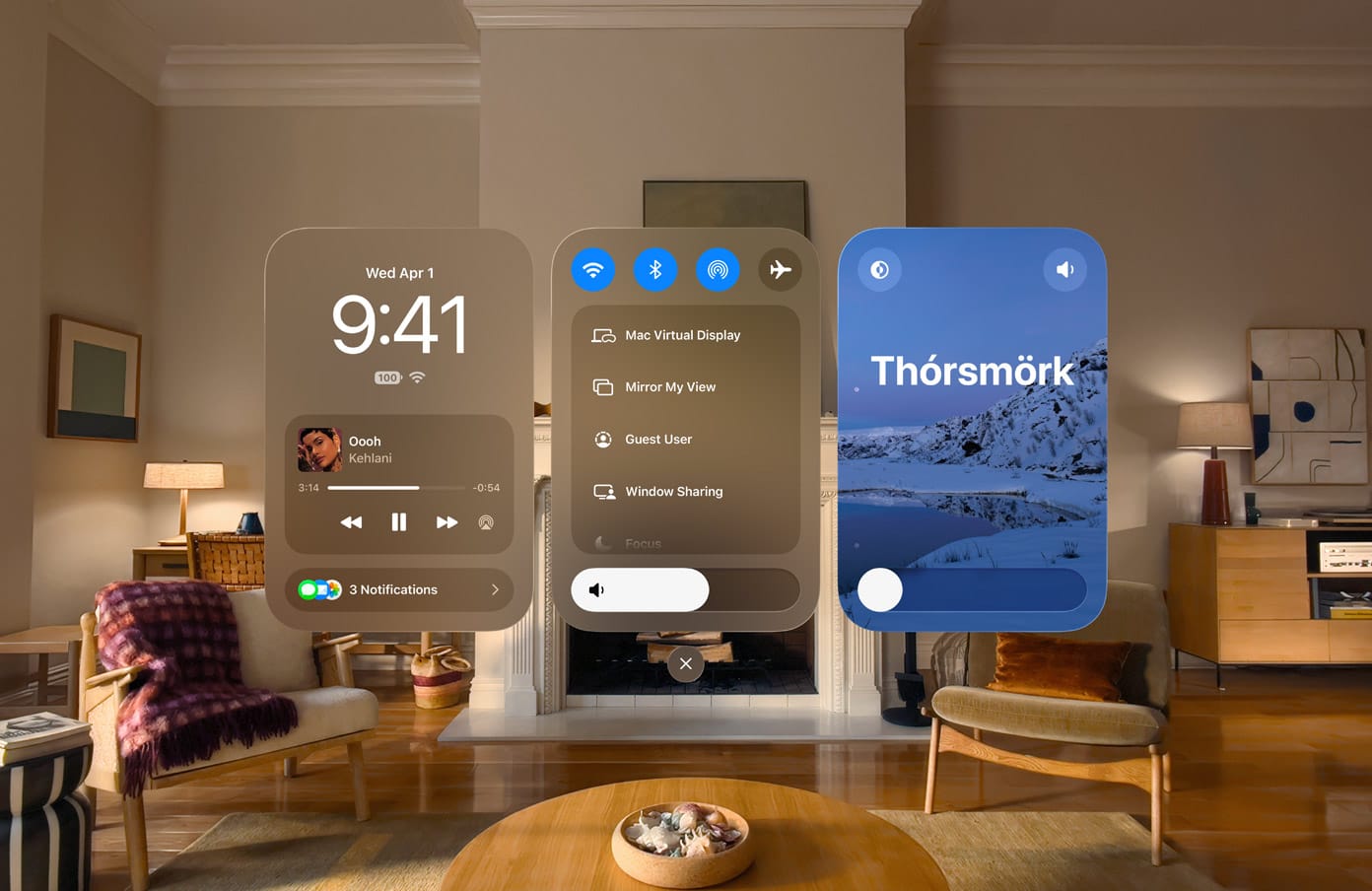
- The left panel shows the date, time, battery level, Wi-Fi status, and playing notifications.
- The center panel shows shortcuts to Wi-Fi, Bluetooth, AirPlay and Airplane Mode, as well as a volume slider and quick controls like Mac Virtual Display, Mirroring, Guest Mode, and Travel Mode.
- The right panel controls the environment, including its day/night mode and the spectrum between full passthrough and full enclosure in the virtual environment, as you would with the digital crown physical control.
Mac Device Hub
Xcode 27 for macOS brings a Device Hub app for developers.
Playing around with the new Device Hub and found a nice surprise: we can now launch apps on Vision Pro from a Mac🎉
This is going to make demos so much easier.
No more helplessly watching family and friends trying to find Encounter Dinosaurs 😂 pic.twitter.com/P46omXiDti— xChester ᯅ (@xchester16) June 13, 2026
For developers, Device Hub should make running Apple Vision Pro demos much smoother, as instead of needing to guide the guest through the visionOS gaze-and-pinch interface, they can instead just remotely launch an experience.
It’s a significant addition because the iPhone and iPad companion apps for Vision Pro cannot launch apps, for some reason.
3x Faster Wi-Fi Initialization
The M5 Apple Vision Pro is a very fast-feeling device, and in my several months with it I’ve experienced no slowdowns.
There is one strange exception, though. After booting up the device, for the first 20 seconds or so there is no internet connection. It takes an unusually long time, compared to all of the other devices I own, to fully connect to Wi-Fi.
It seems that Apple is not unaware of this, as in visionOS 27, the company claims Vision Pro headsets will connect to Wi-Fi up to three times faster.
Curved Windows In Safari, Freeform & Multiview
Before visionOS 27, all windows were flat, with the exception of Mac Virtual Display’s ultrawide mode which is curved.
visionOS 27 adds curved windows support to Safari, Freeform, and Multiview on Apple TV. Safari also makes use of this for a curved tab browsing experience that somewhat wraps around you, as does the Multiview mode of Apple TV.
0:00
Curved windows in Safari on visionOS 27.
Unfortunately, this is a private API for first-party Apple apps. Third party developers cannot make their windows curved – at least not in the Shared Space. In a Full Space, developers can implement a custom rendering solution for this, but this will come with significant tradeoffs in terms of API support and OS consistency.
Extra-Small ‘Accessory Widgets’
One of the biggest additions in visionOS 26 was Widgets, bringing persistent mini-windows you can pin to your physical space, including Clock, Weather, Music, and Photos, alongside an API for developers to build their own.
visionOS 27 adds a new kind of extra small widget called accessory widgets. They’re smaller than visionOS 26’s widgets and could be used for things like a battery level, countdown or timer, a stock price, smart home control button, or shortcut into an app.
0:00
An Accessory Widget on visionOS 27.
The smart home button possibility seems particularly promising. You could, in theory given an app that supports this, add accessory widgets around your home on your physical devices, letting you just look at them and pinch to activate or deactivate them.
Apple has added a first-party accessory widget for Mac Virtual Display, which launches a Mac Virtual Display session for a given Mac, even when it’s locked. While visionOS already creates a button above your MacBook, this could be particularly useful for Mac mini and Mac Studio, letting you just sit down at your desk and tap a virtual button to connect.
Web Environments In Safari
Safari in visionOS 27 adds support for Web Environments, letting developers specify a 3D environment for their webpage that users can optionally enable to surround them.
0:00
Web Environments in Safari in visionOS 27.
This is separate from WebXR, more akin to how web developers set a favicon than anything involving active JavaScript or anything like that.
Gaze-Expanding Notifications
In visionOS 27, notifications can expand when you simply look at them, exposing more information and available actions without the need to pinch.
0:00
It’s another example of using eye tracking to reduce user interface friction.
Auto Subtitles For Videos
visionOS 27 adds an Accessibility feature to automatically generate subtitles for any video, using an on-device speech recognition model.
Vehicle Motion Cues
visionOS 27 is bringing the Vehicle Motion Cues feature that Apple added to its other major operating systems in 2024.
On Apple’s other devices, motion cues appear as animated dots around the edge of the display that move in response to the acceleration, braking, and turning of the vehicle you’re in, with the intention of reducing travel sickness.
It’s unclear how Vehicle Motion Cues will work in visionOS, and whether they might have applications for reducing motion sickness in VR apps too.
Eye-Controlled Power Wheelchairs
visionOS 27 adds the ability to natively control select power wheelchairs using eye tracking.
Apple says the feature will launch with Tolt and LUCI alternative drive systems in the US, with support for both Bluetooth and wired connections.
0:00
Eye-controlled power wheelchairs on visionOS 27.
The company says it “will continue to work with developers to expand support for more wheelchair drive systems”.
Major RealityKit Upgrades
visionOS 27 also brings major upgrades to RealityKit, Apple’s built-in “engine” that powers all experiences in the Shared Space and many Full Space apps too.
RealityKit allows developers to build high-quality VR and mixed reality experiences on Vision Pro without a heavy engine like Unity or Unreal, with consistent rendering, physics, audio, and interactions.
Here are the key upgrades coming to RealityKit in visionOS 27:
Physical Space Lighting
Apps can now cast virtual light on your physical environment.
RealityKit already automatically has virtual objects and interfaces cast shadows into your physical space, based on where it estimates your real lighting is coming from, and this has been a key feature since visionOS. What’s new in visionOS 27 is the ability to cast light too.
0:00
Demo of physical space lighting in visionOS 27.
Under the hood, the feature leverages Vision Pro’s LiDAR-scanned 3D mesh of your room, alongside the reading from the ambient light sensor. The rest is clever software.
Developers can add both point and spot lights to the scene, with support for projective textures to add a pattern (optionally animated) to spot lights for effects such as stained glass, underwater caustics, projected stars, or patterned stage lighting.
Native Gaussian Splat Rendering
Over the past few years, to use an analogy, Gaussian splatting – fitting millions of semitransparent colored blobs (Gaussians) in 3D space so that arbitrary viewpoints can be rendered realistically in real-time – has done for 3D reconstruction what transformers did for AI.
We’ve seen developers do amazing things with it, such as Gracia’s streamable moving volumetric captures. Apple itself uses the technology for the spatial scenes feature of visionOS, and it’s behind the massive upgrade in visual realism we saw from Personas in visionOS 26.
0:00
Native Gaussian splatting in visionOS 27.
RealityKit in visionOS 27 adds native support for rendering Gaussian splats, removing the requirement for developers to implement the code for this themselves.
Realtime Cloth Simulation
RealityKit in visionOS 27 adds integrated real-time deformable-fabric simulation.
0:00
Realtime cloth simulation on visionOS 27.
Developers can create fabric that drapes under gravity, folds and wrinkles, collides with objects, responds to movement, and can be pulled or otherwise interacted with. The stiffness, friction, and material parameters can be set to change how the cloth behaves.
Immersive Audio Upgrades
RealityKit on visionOS 27 adds a Reverb Mesh API, letting apps describe the geometry and acoustic properties of virtual environments.
Developers assign materials to surfaces to specify how each affects sound, including frequency-dependent absorption, frequency-dependent scattering, and reflection and reverberation behavior.
0:00
Visualization of the Reverb Mesh API on visionOS 27.
RealityKit then simulates how sound travels and reverberates through that modeled space, making audio correspond more believably to the VR environment you see.
Many of these features were present in Meta’s XR Audio SDK for Quest headsets, which the company put “on freeze” earlier this year. Valve’s Steam Audio SDK also has many of these features, and Valve continues to update it.