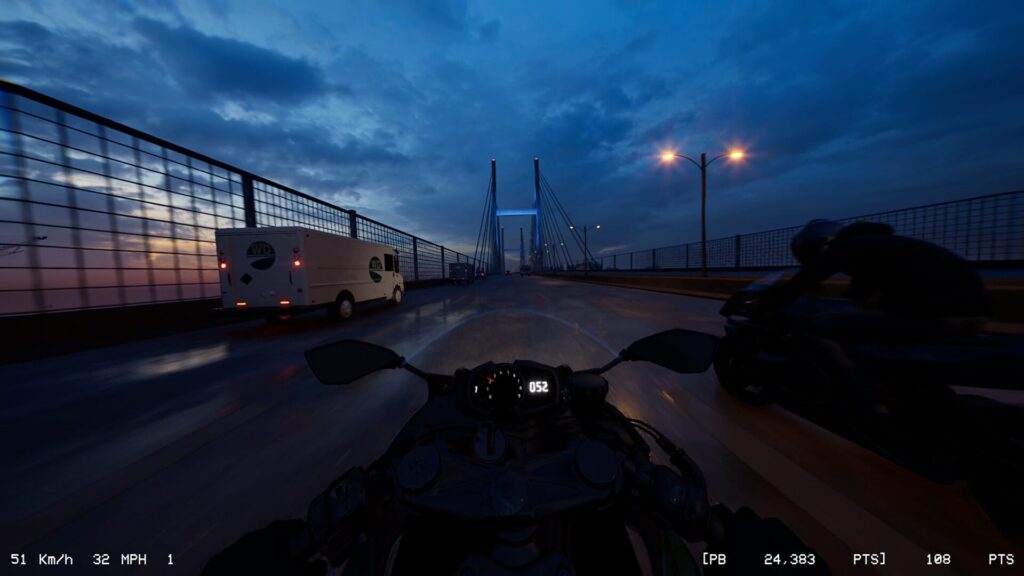
Lanesplit is a motorcycle urban street racing game that added VR support in a June 23 update. Unfortunately, it is plagued with baffling design choices that cripple the experience.
Hybrid games supporting both flatscreen and VR are a tricky balancing act. Particularly in situations like Lanesplit, No Man’s Sky, and several Resident Evil games where VR support is added post-release, developers have to figure out how to bring the immersive gameplay VR players expect without overextending themselves or hurting the much more financially lucrative flatscreen experience.
0:00
What is it?: A VR supported urban motorcycle game
Platforms: Steam
Release Date: Jan 28, 2026; VR support added on June 23, 2026
Developer: FunkyMouse
Price: $17.99
As such, I went into Lanesplit with tempered expectations. I made it a point to play the game on flatscreen first so I could take note of any issues or criticisms about the game itself aside from the VR experience. When I finally put the headset on, it felt like slamming into a brick wall at a hundred miles an hour.
There is no motion controller support for turning your bike in VR. I specify turning because the left and right triggers can be used to brake and accelerate, respectively. This alone was baffling. Why do the triggers work if motion doesn’t?
Right away, this felt like a miss. It’s a first person racing game in virtual reality. To pass on adding hand poses and physically gripping the handlebars with the grip button would have been fine if the controllers were still able to at least control the bike. I have no problem using a traditional game controller for a VR game. Games like Hellblade: Senua’s Sacrifice and Edge of Nowhere were perfectly fine experiences. It just felt wrong to be riding a motorcycle in VR without motion controller support, like the immersion was stripped away.
PC Specs Used
My PC uses an RTX 5070 Ti with 16GB of VRAM, a Ryzen 7 9850X3D processor, and 32GB of DDR5 RAM.
This review was conducted using a Meta Quest 3 via the Virtual Desktop app on the Ultra preset for resolution. I preset the in-game graphics to the High preset.
You can find the minimum and recommended specs on the Steam page to learn more.
The two primary issues I noted in my flatscreen run were unfortunately highlighted by being in VR. Lanesplit is more or less a score-chasing endless runner with options for weather conditions and traffic volume. The latter sticks out like a sore thumb. Vehicles in Lanesplit move at painfully slow speeds. At one point, I had to slow down because both lanes were occupied during a long turn and I did not have the space to squeeze between them, so I waited for the semi truck in the right lane to pass the car in the left lane. This felt like an eternity, riding the bike at roughly twenty miles an hour. Every car moves at a snail’s pace in this game, presumably to heighten the sensation of zipping and cutting through traffic at high speed. It was impossible to unsee after noticing this and VR just made it feel worse.
0:00
Then there is the performance. I use a performance meter whenever I review a game and Lanesplit never exceeded thirty-six frames per second with a heavy amount of reprojection. This combined with the turtle-like vehicles kills any sensation of speed in the game.
Looking out to my sides at the admittedly well designed city was also problematic. The low framerate meant every building, guardrail, etc. stuttered in the headset while riding at top speed. I could look to either side for a few seconds at a time before I started to get dizzy. There are options to tune the graphics to match your PC’s capabilities, but nothing to boost the framerate.
Comfort
Lanesplit utilizes stick-based acceleration and turning using a traditional game controller. It has a motion vignette setting for anyone prone to motion sickness. Racing games in general are difficult for newer VR users and with the noted framerate issues in this game, we do not recommend Lanesplit for first-time or inexperienced VR players.
The last thing to note is the menus. The main menu, and Steam has a pop up warning for this when you boot the game, presents in a theater mode. This was begrudgingly acceptable, but bringing up the in game menu during a run does not work in VR. That menu, to continue racing or return to the main menu, only comes up on the PC monitor. This was a perplexing design decision, hopefully an unintentional one. Fastest way to ruin a VR experience is to force the player to take the headset off to perform any in-game action. That annoyance capped off an entirely forgettable, at times frustrating VR session.
In the end, Lanesplit’s VR support comes up woefully short. I will revisit the game if future updates promise a better experience. If you are seeking a fun motorcycle escapade in VR, there are far better options like VRacer Hoverbike available. Right now, it is hard to recommend Lanesplit to any VR user.